

Schedule activities in Simulation Framework
Last update: 19.09.2025An Activity is basic simulation participant in simulation framework, where Topics can be provided or consumed between other activities. To fulfill the simulation demands, all activities can be scheduled through user's simulation_scheduling input.
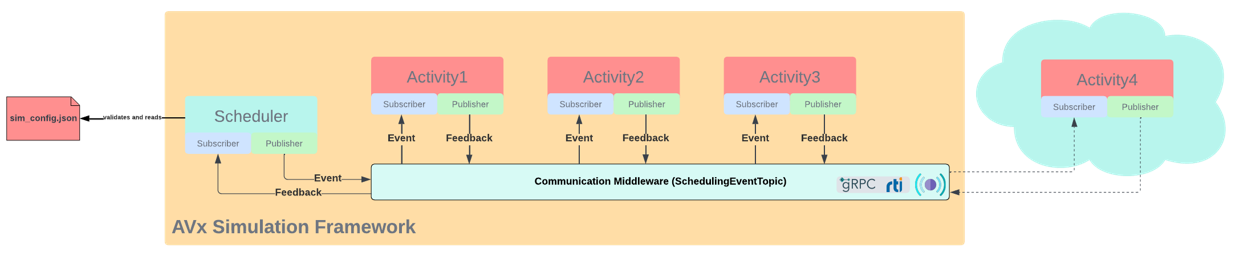
It provides the feature that the user can define what Activities and how they should behave in simulation. With the configuration in json, user could define which activities, their topics' cycle times, their location and type. It is parsed and understood by scheduler core and during the simulation, scheduler sends corresponding events to different target activity via communication middleware. Thus, the activities can be scheduled under a deterministic behavior.
Simulation scheduling example
Here is an example of simulation_scheduling content in solver settings:
"sim_instance_name"
Give a name or a description for the simulation setup.
"activities"
This section contains a list of activities that will be part of the simulation loop. The detail of the activities should be defined as shown below:
"name"
The unique identifier of the activity in the instance of Simulation Framework. The identifier is used to instantiate the activity in the ActivityFactory.
"is_primary_activity"
A boolean flag that indicates whether this activity is used as a primary activity. In Autonomy simulation, the ground truth generator must be set as primary activity, which generates environment inputs for all other simulation participants.
"topics_cycling_info"
This list describes the topic and the individual cycle time that is needed. This is a mandatory field for each activity, unless "depends_on" is specified.
- "topic_id" A string identifier for the topic. Currently, multi-rate topics inside Simulation Framework are not supported yet. Use the specifier
"_all_"to indicate all topics in this activity, and define their cycle time later in"topic_cycle_time_in_ms". - "topic_cycle_time_in_ms" An unsigned integer that describes the cycle time of the topic in milliseconds.
"depends_on"
This field allows you to create a list of dependency for the current activity on another activity specified by the user. Once a dependency is set up, "topics_cycling_info" is no longer mandatory for this activity. In this case, this activity will be stepped immediately after its dependent activity. If additional "topics_cycling_info" is also provided, this activity will be stepped only when its dependencies have been finished and its cycle time is reached.
"type"
This field indicates the location of the activity. "built-in" means that this is an activity pre-built in Activity Factory of Simulation Framework core. "standalone" means that this is a standalone activity running outside Simulation Framework as a dedicated process. During simulation startup, Simulation Framework core will try to connect with all required standalone Activities if they are given in the config.
Validation of simulation config
Before each simulation, the rules defined above will be validated by the parser. An error message will be thrown if any field contains an error or is defined against the rules.
