

ZOSAPI.Analysis.RayTracing.IAS_PathAnalysis Interface Reference
Last update: 17.07.2025
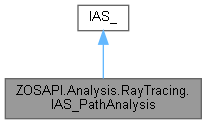
Inheritance diagram for ZOSAPI.Analysis.RayTracing.IAS_PathAnalysis:
Properties | |
| string | RayDatabaseFile [get, set] |
| string[] | AvailableRayDatabaseFiles [get] |
| int | FirstRay [get, set] |
| int | LastRay [get, set] |
| string | FilterString [get, set] |
| bool | GeneratePathFilters [get, set] |
| double | RelativeMinimumFlux [get, set] |
| PathAnalysisSortType | SortBy [get, set] |
Additional Inherited Members | |
 Public Member Functions inherited from ZOSAPI.Analysis.Settings.IAS_ Public Member Functions inherited from ZOSAPI.Analysis.Settings.IAS_ | |
| IMessages | Verify () |
| void | Save () |
| Saves the current settings to the default CFG file. | |
| void | Load () |
| Loads settings from the default CFG file. | |
| void | Reset () |
| Resets the settings back to the defaults for the current analysis. | |
| bool | SaveTo (string settingsFile) |
| Saves the current settings to the specified file. | |
| bool | LoadFrom (string settingsFile) |
| Replaces the current settings with settings read from the specified file. | |
| bool | ModifySettings (string settingsFile, string typeCode, string newValue) |
| Changes a single setting in the specified file. See the MODIFYSETTINGS DDE command help documentation for more information. | |
Detailed Description
Usage (see Example 10 for a full sample)
C#
// Save Ray Path Analysis to Text File
if (TheApplication.LicenseStatus == ZOSAPI.LicenseStatusType.PremiumEdition)
{
IA_ RayPath = TheSystem.Analyses.New_Analysis(AnalysisIDM.PathAnalysis);
ZOSAPI.Analysis.RayTracing.IAS_PathAnalysis RayPath_settings = RayPath.GetSettings() as ZOSAPI.Analysis.RayTracing.IAS_PathAnalysis;
RayPath_settings.RayDatabaseFile = "e10_API_RayTrace.ZRD";
RayPath.ApplyAndWaitForCompletion();
IAR_ Rays = RayPath.GetResults();
Rays.GetTextFile(TheApplication.SamplesDir + "\\API\\CS\\e10_RayPathAnalysis.txt");
}
else
{
Console.Write("\nThe RayPathAnalysis is a premium feature only\n\nPress any key to continue\n");
Console.ReadKey();
}
Base interface for all analysis windows. This interface can be accessed via the I_Analyses interface.
Definition: IA_Base.cs:29
IAR_ GetResults()
Gets the result data (if available) for the current analysis.
IMessage ApplyAndWaitForCompletion()
Re-runs the analysis with the current settings and waits for it to finish calculating.
Definition: IAS_PathAnalysis.cs:40
Definition: IAS_PathAnalysis.cs:10
Definition: IAS_FieldCurvatureAndDistortion.cs:5
AnalysisIDM
All available analysis types. See the I_Analyses interface for more information.
Definition: I_Analyses.cs:15
The ZOSAPI namespace contains classes for initially connecting to zemax. See also ZOSAPI_Connection,...
Definition: IAS_FieldCurvatureAndDistortion.cs:5
C++
// Save Ray Path Analysis to Text File
if (TheApplication->LicenseStatus == ZOSAPI_Interfaces::LicenseStatusType::LicenseStatusType_PremiumEdition) {
IA_Ptr RayPath = TheSystem->Analyses->New_Analysis(AnalysisIDM_PathAnalysis);
ZOSAPI_Interfaces::IAS_PathAnalysisPtr RayPath_settings = RayPath->GetSettings();
RayPath_settings->RayDatabaseFile = "e10_API_RayTrace.ZRD";
RayPath->ApplyAndWaitForCompletion();
IAR_Ptr Rays = RayPath->GetResults();
Rays->GetTextFile(TheApplication->SamplesDir + "\\API\\CPP\\e10_RayPathAnalysis.txt");
}
Matlab
% Save Ray Path Analysis to Text File
if TheApplication.LicenseStatus == ZOSAPI.LicenseStatusType.PremiumEdition
RayPath_settings = RayPath.GetSettings();
RayPath_settings.RayDatabaseFile = 'e10_API_Raytrace.ZRD';
RayPath.ApplyAndWaitForCompletion();
Rays = RayPath.GetResults();
Rays.GetTextFile(System.String.Concat(TheApplication.SamplesDir, '\API\Matlab\e10_RayPathAnalysis.txt'));
else
fprintf('\nThe RayPathAnalysis is a premium feature only\n');
end
Python
# Save Ray Path Analysis to Text File
if (TheApplication.LicenseStatus == ZOSAPI.LicenseStatusType.PremiumEdition):
# there is a bug in ZOS16.5 SP4 with COM; need to use ZOS16.5 SP5 or higher to run this code successfully
RayPath = TheSystem.Analyses.New_Analysis(ZOSAPI.Analysis.AnalysisIDM.PathAnalysis)
RayPath_settings = RayPath.GetSettings()
zrd = "e10_API_RayTrace.ZRD"
RayPath_settings.RayDatabaseFile = zrd
RayPath.ApplyAndWaitForCompletion()
Rays = RayPath.GetResults()
Rays.GetTextFile(TheApplication.SamplesDir + "\\API\\Python\\e10_RayPathAnalysis.txt")
Property Documentation
◆ AvailableRayDatabaseFiles
|
get |
◆ FilterString
|
getset |
◆ FirstRay
|
getset |
◆ GeneratePathFilters
|
getset |
◆ LastRay
|
getset |
◆ RayDatabaseFile
|
getset |
◆ RelativeMinimumFlux
|
getset |
◆ SortBy
|
getset |
