

OpenTD.CaseSetManager Class Reference
Last update: 16.07.2025Use the CaseSetManager to run cases in batch mode, or to perform other operations available in TD's Case Set Manager. More...
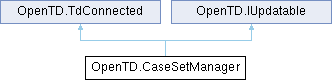
Public Member Functions | |
| CaseSetManager (ThermalDesktop _td) | |
| List< CaseSet > | GetCaseSets () |
| CaseSet | Add (string name, string groupName="", string sindaFilenames="") |
| void | Rename (string name, string groupName, string newName, string newGroupName) |
| void | Delete (string name, string groupName="") |
| void | Run (string name, string groupName="", bool useOldMethod=false) |
| Run one case. Set useOldMethod to true for a less-verbose run method that may not be compatible with every case configuration. | |
| void | Run (IEnumerable< int > caseIndices) |
| Run multiple cases, just like selecting them and pressing the run button in the GUI. Use this method to run cases using TD batch mode. | |
| bool | IsCaseRunning () |
| Some types of cases return control to TD before they finish. Example: cases involving Dynamic Sinda. This also means they return control to OpenTD before the case finishes. Use this method to check whether a given TD instance is currently running this kind of case. This method is currently experimental. | |
| void | Update () |
| Updates the TD entity with the latest client data. | |
| void | UpdateFromTD () |
| Updates the client-side instance with the latest data from the TD entity. | |
Properties | |
| CaseSetManagerOptions | Options [get] |
Detailed Description
Use the CaseSetManager to run cases in batch mode, or to perform other operations available in TD's Case Set Manager.
- See also
- OpenTD.CaseSet
Constructor & Destructor Documentation
◆ CaseSetManager()
|
inline |
Member Function Documentation
◆ Add()
|
inline |
◆ Delete()
|
inline |
◆ GetCaseSets()
|
inline |
◆ IsCaseRunning()
|
inline |
Some types of cases return control to TD before they finish. Example: cases involving Dynamic Sinda. This also means they return control to OpenTD before the case finishes. Use this method to check whether a given TD instance is currently running this kind of case. This method is currently experimental.
- Returns
◆ Rename()
|
inline |
◆ Run() [1/2]
|
inline |
Run multiple cases, just like selecting them and pressing the run button in the GUI. Use this method to run cases using TD batch mode.
- Parameters
-
caseIndices
◆ Run() [2/2]
|
inline |
Run one case. Set useOldMethod to true for a less-verbose run method that may not be compatible with every case configuration.
- Parameters
-
name groupName useOldMethod
◆ Update()
|
inline |
Updates the TD entity with the latest client data.
Implements OpenTD.IUpdatable.
◆ UpdateFromTD()
|
inline |
Updates the client-side instance with the latest data from the TD entity.
Implements OpenTD.IUpdatable.
Property Documentation
◆ Options
|
get |
The documentation for this class was generated from the following file:
- C:/Users/mgarrett/source/repos/BuildsTdSuite/builds/OpenTD/OpenTD/CaseSetManager.cs
