

vss::data_access::SensorMetadata Struct Reference
Last update: 16.07.2025Metadata associated to the produced data. More...
Collaboration diagram for vss::data_access::SensorMetadata:
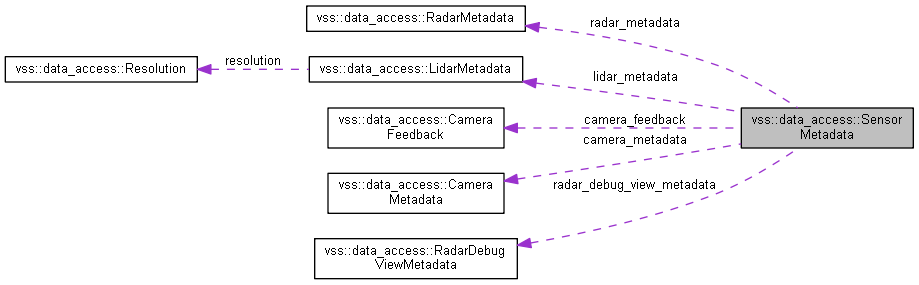
Public Attributes | |
| CameraMetadata | camera_metadata = 1 |
| LidarMetadata | lidar_metadata = 2 |
| RadarMetadata | radar_metadata = 3 |
| RadarDebugViewMetadata | radar_debug_view_metadata = 8 |
| CameraFeedback | camera_feedback = 4 |
| bool | data_serialized = 5 |
| string | deploy_host_address = 6 |
| google::protobuf::Int32Value | data_access_server_port = 7 |
Detailed Description
Metadata associated to the produced data.
Member Data Documentation
◆ camera_metadata
| CameraMetadata vss::data_access::SensorMetadata::camera_metadata = 1 |
ONEOF(value) CameraMetadata.
◆ lidar_metadata
| LidarMetadata vss::data_access::SensorMetadata::lidar_metadata = 2 |
ONEOF(value) LidarMetadata.
◆ radar_metadata
| RadarMetadata vss::data_access::SensorMetadata::radar_metadata = 3 |
ONEOF(value) RadarMetadata.
◆ radar_debug_view_metadata
| RadarDebugViewMetadata vss::data_access::SensorMetadata::radar_debug_view_metadata = 8 |
ONEOF(value) RadarDebugViewMetadata.
◆ camera_feedback
| CameraFeedback vss::data_access::SensorMetadata::camera_feedback = 4 |
ONEOF(feedback) Current values of the camera sensor parameters exposed to the feedback control that were used to produce this data.
◆ data_serialized
| bool vss::data_access::SensorMetadata::data_serialized = 5 |
Indicates if the data were serialized during the simulation.
◆ deploy_host_address
| string vss::data_access::SensorMetadata::deploy_host_address = 6 |
Deploy host address where the sensor data was generated.
◆ data_access_server_port
| google::protobuf::Int32Value vss::data_access::SensorMetadata::data_access_server_port = 7 |
The TCP port used to communicate with the data access server. If no value provided, data are available only on the shared memory
The documentation for this struct was generated from the following file:
- sensor_data_description.proto
