

Universal Scene Description (USD) Basics
Universal Scene Description (USD) is an open-source framework for representing and exchanging complex 3D scenes. It serves as the backbone of NVIDIA Omniverse and when integrating Omniverse with scripting libraries like those available in PyAnsys, understanding USD is critical because it allows you to programmatically create, modify, and compose scenes using Python. This makes it possible to automate workflows, link simulation results to 3D visualizations, and maintain a consistent data model across diverse applications without manual file conversions.
What is USD?
USD is a high-performance, extensible platform for building animated 3D scenes collaboratively. It meets the demands of large-scale film and visual effects production by enabling seamless integration across various digital content creation tools. Its continually expanding set of schemas covers areas such as geometry, shading, lighting, and physics, while its unique composition capabilities allow for diverse methods of assembling assets and fostering efficient collaboration.
- Developed by Pixar, USD is a framework for 3D graphics data interchange.
- 3D file format
- C++ library with Python API
- Read/Write
- Composition engine
- And much more
- Targeted at speed, scalability, interoperability, and collaboration.
Reference: Universal Scene Description (USD)
Alliance for OpenUSD
A group of five companies announced the formation of the Alliance for OpenUSD (AOUSD), the purpose of which is “to promote the standardization, development, evolution, and growth of Pixar’s Universal Scene Description (USD) technology.” The founding members of the group are Pixar, Adobe, Apple, Autodesk, and NVIDIA, working with the Linux Foundation’s Joint Development Foundation (JDF). The alliance aims to foster collaboration and innovation in the USD ecosystem, ensuring its continued relevance and adoption across industries.
USD is an OpenSource project released under a modified Apache license.
USD File Types:
.usda- ASCII format (Plain Text).usdc- Binary format (Optimized for speed and size).usd- Compressed format (Plain Text or Binary).usdz- Compressed format (Archivezip)
Refer to the USD Glossary for features and concepts. USD Glossary
USD Essentials
- USDA File Structure
- USD Schema
- Scene Graph - Stage
- Mesh Data - Prims(Primitive, has attributes and relationships)
- Materials
- Lights
File Structure - Prims
#usda 1.0
(
    defaultPrim = "MyScene"
    upAxis = "Y"
)

def Xform "simpleMesh" (
    kind = "component"
)
{
    def Mesh "cube"
    {
        point3f[] points = [(0,0,0), (1,0,0), (1,1,0), (0,1,0)]
        normal3f[] normals = [(0,0,1)](
            interpolation = "uniform"
        )
    }
}
Scene Graph
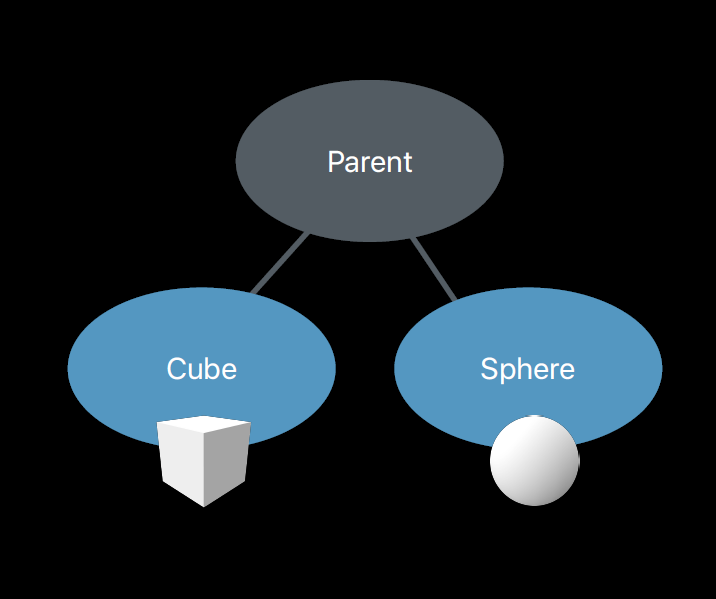
This defines the object hierarchy and relationships in a 3D scene. Transforms on a parent affect all it's child prims.
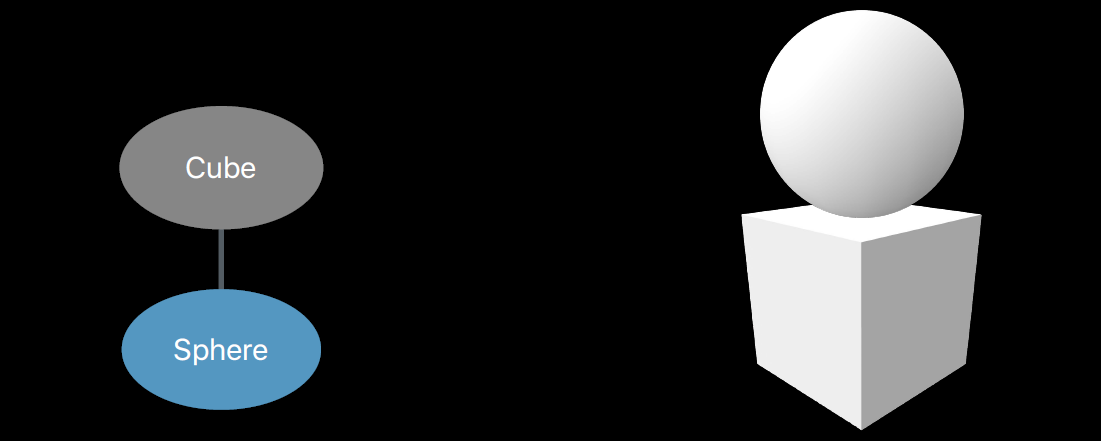
def Xform "Parent"
{
    def Cube "Cube"
    {

    }
    def Sphere "Sphere"
    {

    }

    def Scope "Materials"
    {
        def Material "Glass"
        {

        }
    }
}
Mesh Data
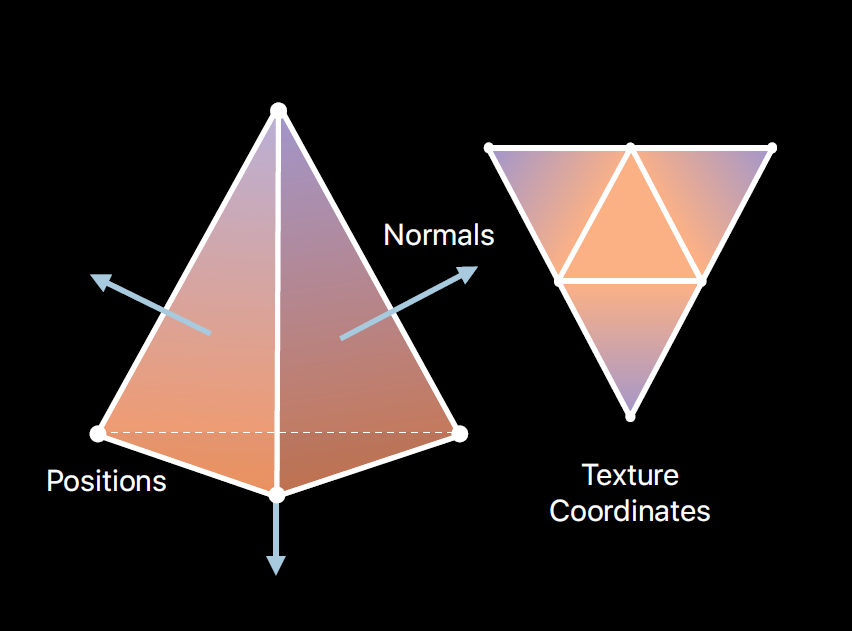
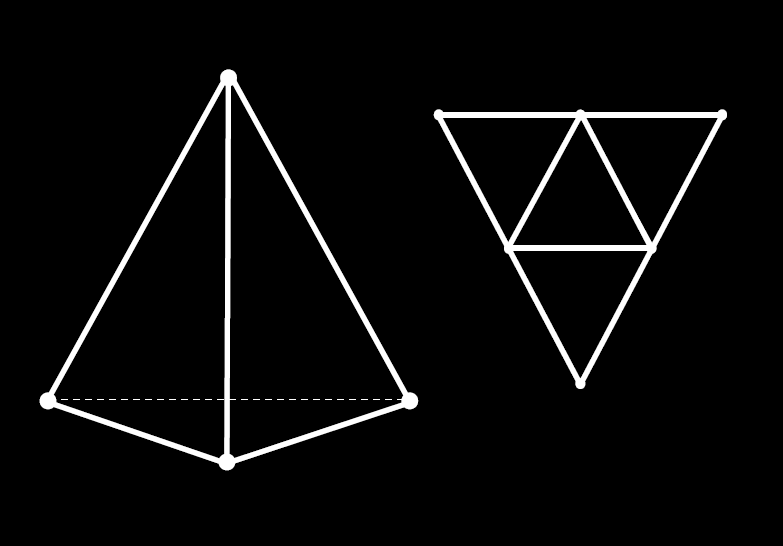
- Mesh attributes
- Mesh topology
#usda 1.0
(
    defaultPrim = "Tetrahedron"
)

def Mesh "Tetrahedron"
 {
    # Mesh topology
    points3f[] points = [(-1,-1,-1), (1,-1,-1), (-1,1,-1), (1,1,1)]
    int[] faceVertexCounts = [3, 3, 3, 3]
    int[] faceVertexIndices = [1,2,0 3,2,1 3,0,2 3,1,0]

    # Mesh attributes
    normals3f[] normals = [(-0.58, -0.58, -0.58), (0.58,0.58,-0.58), (0.58,-0.58,0.58), (-0.58,0.58,0.58)](
        interpolation = "uniform"
    )

    # Primitive variables
    float2[] primvars:st = [(0.75,0.43), (0.5,0.87), (0.25,0.43), (1,0.87), (0,0.87),(0.5,0.5)](
        interpolation = "faceVarying"
    )

    int[] primvars:st:indices = [0,1,2, 3,1,0, 4,2,1, 5,0,2]

    uniform token subdivisionScheme = "none"
 }
Materials
-
UsdPreviewSurface
- Schema for realistic real-time rendering
-
Physically based material description
-
Supported Workflows
- Metallic-Roughness
- Specular-Glossiness
Material Properties - UsdPreviewSurface
Example
diffuseColor: (1,1,1) # White as per RGB definition
normal = normal.png
occlusion = occlusion.png
metallic = metallic.png
roughness = roughness.png
def Material "MyMaterial"
{
    def Shader "pbr"
    {
        uniform token info:id = "UsdPreviewSurface"
        color3f diffuseColor = (1, 1, 1) # White
        float input:metallic = 1 # metallic
        float input:roughness = 0 # no roughness
        token output:surface

    }
    token outputs:surface.connect = </MyMaterial/pbr.outputs:surface>

}
from pxr import Usd, UsdGeom, Gf, Vt, Sdf, Tf

# 1) Create the stage and our Mesh prim
stage = Usd.Stage.CreateNew("sample.usda")
mesh  = UsdGeom.Mesh.Define(stage, "/Tetrahedron")

# (Optional) make it the defaultPrim
stage.SetDefaultPrim(mesh.GetPrim())

# 2) Set the point positions
mesh.GetPointsAttr().Set(Vt.Vec3fArray([
    Gf.Vec3f(-1, -1, -1),
    Gf.Vec3f( 1, -1, -1),
    Gf.Vec3f(-1,  1, -1),
    Gf.Vec3f( 1,  1,  1),
]))

# 3) Set the face‐vertex counts & indices (topology)
mesh.GetFaceVertexCountsAttr().Set(Vt.IntArray([3,3,3,3]))
mesh.GetFaceVertexIndicesAttr().Set(Vt.IntArray([
    1,2,0,
    3,2,1,
    3,0,2,
    3,1,0
]))

# 4) Turn off subdivision
mesh.GetSubdivisionSchemeAttr().Set(UsdGeom.Tokens.none)

# 5) Set per‐face (uniform) normals
mesh.GetNormalsAttr().Set(Vt.Vec3fArray([
    Gf.Vec3f(-0.58, -0.58, -0.58),
    Gf.Vec3f( 0.58,  0.58, -0.58),
    Gf.Vec3f( 0.58, -0.58,  0.58),
    Gf.Vec3f(-0.58,  0.58,  0.58),
]))
mesh.SetNormalsInterpolation(UsdGeom.Tokens.uniform)

# 6) Manually create the face‐varying "st" primvar and its indices
prim = mesh.GetPrim()

# Create primvars:st by passing ["primvars","st"] as the name
st_attr = prim.CreateAttribute(
    ["primvars","st"],                     # this yields an attribute named "primvars:st"
    Sdf.ValueTypeNames.Float2Array         # typeName
)
st_attr.Set(Vt.Vec2fArray([
    Gf.Vec2f(0.75, 0.43),
    Gf.Vec2f(0.5,  0.87),
    Gf.Vec2f(0.25, 0.43),
    Gf.Vec2f(1.0,  0.87),
    Gf.Vec2f(0.0,  0.87),
    Gf.Vec2f(0.5,  0.5),
]))
# Attach the interpolation metadata
st_attr.SetMetadata("interpolation", UsdGeom.Tokens.faceVarying)

# st:indices
idx_attr = prim.CreateAttribute(
    ["primvars","st","indices"],
    Sdf.ValueTypeNames.IntArray
)
idx_attr.Set(Vt.IntArray([
    0,1,2,
    3,1,0,
    4,2,1,
    5,0,2
]))

# 7) Save out the USD‐ASCII file
stage.GetRootLayer().Save()
True
