

FolderBuilder Class Reference
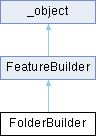
Last update: 17.07.2025Represents a Folder Builder. More...
Public Member Functions | |
| Remove (self, *args) | |
| Removes the specified feature object from the folder. | |
| Add (self, feature) | |
| Adds the specified feature object into the folder. | |
| Insert (self, feature, after=None) | |
| Inserts the specified feature object into the folder after another specified feature. | |
| IsCompatible (self, feature) | |
| Checks if the specified feature object is compatible with this folder. | |
 Public Member Functions inherited from FeatureBuilder Public Member Functions inherited from FeatureBuilder | |
| Commit (self) | |
| Commits any edits that have been applied to the builder. | |
| ShowResult (self) | |
| Updates the feature to reflect the result of an edit to the feature for all builders that support showing results. | |
Properties | |
| Features = property(fget = __GetFeatures, fset = __SetFeatures) | |
| Gets or sets features belonging to this folder. | |
| Category = property(fset = __SetCategory) | |
| Gets or sets the category type of the folder. | |
| Properties inherited from FeatureBuilder | |
| Feature = property(fget = __GetFeature) | |
| Returns the feature being edited, or the created feature if the builder is being used in creation mode. | |
| FullName = property(fget = __GetFullName) | |
| Gets the full name of the feature being edited. | |
| Name = property(fget = __GetName, fset = __SetName) | |
| Gets or sets the name of the feature being edited. | |
| NameWithContext = property(fget = __GetNameWithContext) | |
| Gets the name with context of the feature being edited. | |
| Status = property(fget = __GetStatus) | |
| Returns the status of the feature being edited. | |
Detailed Description
Represents a Folder Builder.
The Folder Builder creates or edits Folder features.
To create a new instance of this class, use FeatureCollection.CreateFolderBuilder.
Member Function Documentation
◆ Add()
| Add | ( | self, | |
| feature ) |
Adds the specified feature object into the folder.
- Parameters
-
[in] feature the feature object.
- Returns
- True if successfully added into the folder; Otherwise, returns False.
◆ Insert()
| Insert | ( | self, | |
| feature, | |||
| after = None ) |
Inserts the specified feature object into the folder after another specified feature.
- Parameters
-
[in] feature the feature object to add. [in] after a feature object after which the feature object should be insert.
- Returns
- True if successfully inserted into the folder; Otherwise, returns False.
◆ IsCompatible()
| IsCompatible | ( | self, | |
| feature ) |
Checks if the specified feature object is compatible with this folder.
- Parameters
-
[in] feature the feature object.
- Returns
- True if the specified feature object is compatible with this folder; Otherwise, returns False.
◆ Remove()
| Remove | ( | self, | |
| * | args ) |
Removes the specified feature object from the folder.
The specified feature object must be a member of the folder to be removed from it.
- Parameters
-
[in] feature the feature object.
Property Documentation
◆ Category
|
static |
Gets or sets the category type of the folder.
The values are:
0 - None.
1 - Properties.
2 - Sources.
3 - Sensors.
4 - Simulations.
Value type: Integer.
The default value is None (0). A category type other than None (0) must be defined.
◆ Features
|
static |
Gets or sets features belonging to this folder.
The Features property takes and returns a list of feature objects.
Value type: List of Feature objects.
The default value is an empty list.
The documentation for this class was generated from the following file:
- SpeosNX.py
