

PAT authentication
Last update: 19.03.2026What is PAT authentication?
A Personal Access Token (PAT) is a secure, long-lived authentication token that allows a user or application to access Ansys services and APIs without requiring an interactive sign-in each time. Instead of entering a username and password for every sign in workflow, the PAT acts as a “portable credential” that can be used programmatically.
PATs are typically used when:
- Automation scripts or tools need to authenticate without a browser
- Applications require secure, non-interactive access to Ansys APIs
- Users need a token to use command-line tools or scheduled jobs
PATs are associated with:
- A specific user, and
- A specific Ansys account, and
- A defined set of scopes/permissions.
PATs also support configurable expiration dates and can be revoked anytime through the Ansys ID Portal.
Where is PAT authentication used?
PAT authentication is enabled in Ansys ID SSO, which is integrated into Ansys products and internal/external systems.
-
Automation: Scripts or tools running on servers, or cron jobs often cannot perform browser-based login. PATs enable:
- Automated API calls
- Nightly batch jobs
- Backend service integrations
-
End-User Tools and Command-Line Utilities: Customers who use command-line utilities or local automation can authenticate using a PAT instead of logging in through a browser each time.
-
Partner & Customer Integrations: External partners or enterprise customers integrating their systems with Ansys-managed services use PATs when their applications need secure programmatic access.
High-level flow diagram
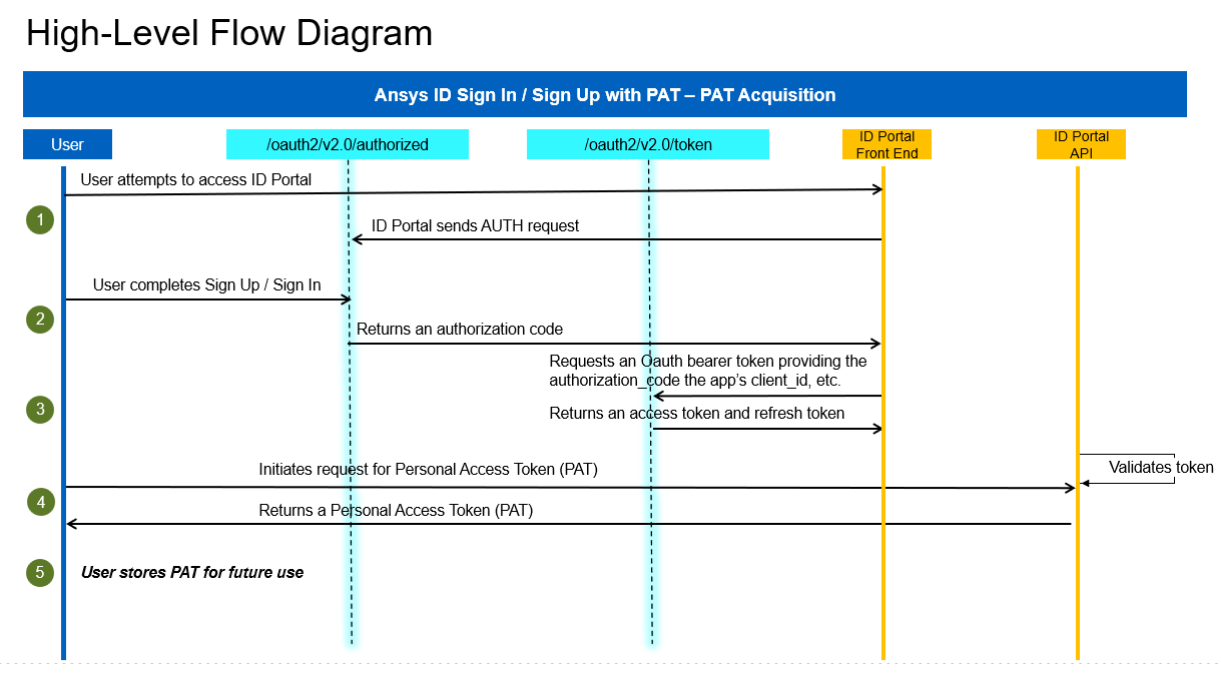
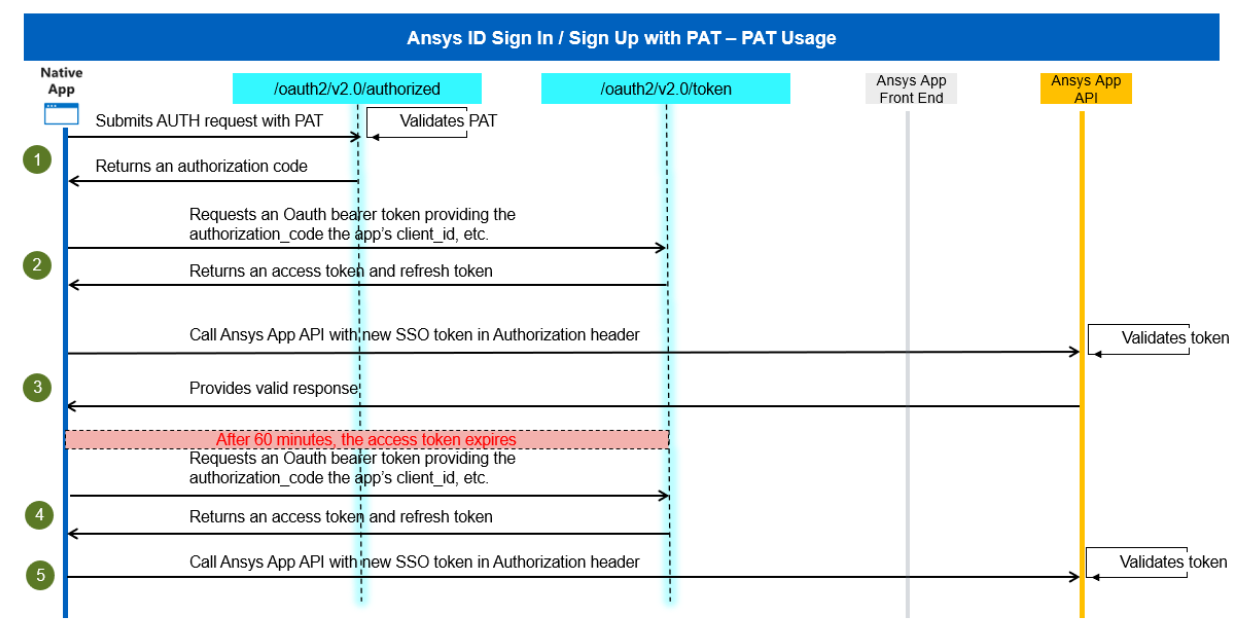
Below is a simplified representation of the PAT Authentication process with summary of flow:
- PAT is created interactively through Ansys ID Portal
- User or application passes the PAT to a helper script or authentication flow
- PAT is validated by Ansys ID SSO
- Ansys ID SSO returns an Access Token, which is used for API calls
Key terminology
-
Personal Access Token (PAT): A long-lived token generated through the AnsysID Portal.
- Represents a user’s permissions under given account.
- Has configurable expiration
- Is used to obtain an Ansys ID SSO Access Token
- Can be revoked anytime
-
AnsysID SSO: The identity platform used by Ansys internal/external app for authentication:
-
Authenticating users
-
Supports OpenID Connect (OIDC)
-
Validating PATs
-
Providing Access, ID, and Refresh tokens
When a PAT is used, Ansys ID SSO performs the actual authentication and token issuance
-
-
Access Token: A short-lived JWT (JSON Web Token) returned by Ansys ID SSO after validating a PAT. It contains:
-
User identity
-
Allowed scopes
-
Expiration time
-
Permissions to access Ansys API
Most API calls require the Access Token in the Authorization: Bearer
header.
-
-
Ansys ID Portal: This is the user interface where customers and internal staff can:
-
Sign into Ansys ID
-
Manage user profiles
-
View or request account membership
-
Generate, view, or revoke Personal Access Tokens (PATs)
The portal is the primary method for end users to obtain PATs.
-
-
Scopes: Determine what kind of Ansys ID SSO tokens are granted. Examples include:
- openid
- offline_access
- Product or resource-specific scopes
-
Account: An Ansys ID Account represents an organization, business entity, or project space. PATs are always associated with a specific account, and all API access is performed in the context of that account.
Overview - Instructions for end users and customers
This section is written for external users who need to obtain and use Personal Access Tokens (PATs) in their applications, scripts, or integrations.
What is a Personal Access Token (PAT)?
A Personal Access Token (PAT) is a secure, time-limited token used to authenticate to Ansys APIs or tools without requiring your username and password every time.
A PAT is:
- A secure alternative to using your password
- Unique for each user
- Time-limited (you choose expiration)
- Sometimes required by automation tools or scripts
Note: A PAT represents your identity. Treat it like a password.
You will need a PAT if:
- You are using an Ansys tool or automation script that calls Ansys APIs
- Your application (or your team) was instructed to use PAT authentication
- You are following a developer guide that requires PAT usage
How to generate a PAT
-
Requirements
Before you can generate a PAT:
- You must have an Ansys ID SSO user
- You must be associated with a customer account number in salesforce
- If you do not see an account listed > contact your Ansys Support Coordinator
-
Step-by-Step Guide
-
Go to the Ansys ID Portal:
https://id.ansys.com/ -
Sign in with your Ansys ID SSO credentials
-
If linked to multiple accounts, select the appropriate account (optional)
-
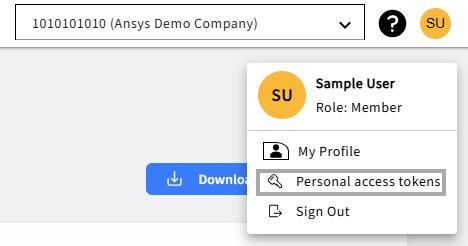
Click on profile icon and select the Personal access token
-
Click on Create Token button
-
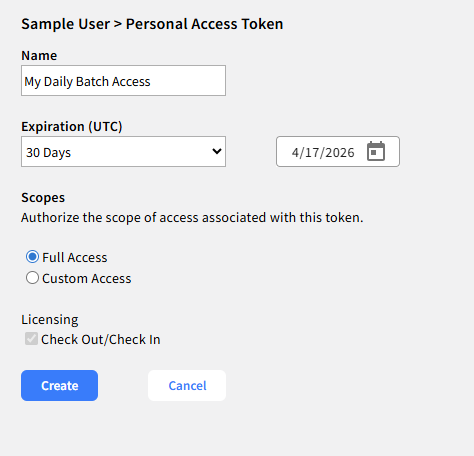
Provide:
- Token Name
- Expiration Date
- Scopes → Select Full Access under Scope for SSO authentication using a PAT
-
Click Create button
- Copy the generated PAT
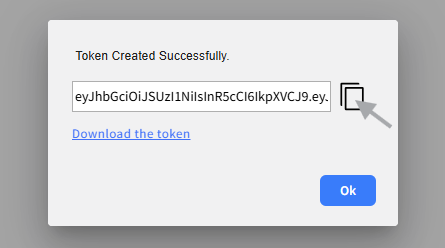
Provide the PAT to your application or to the helper script for Ansys ID SSO token generation.
-
Best Practices
- Treat your PAT like a password
- Store it securely
- Rotate it regularly
- Never share it wih others
- Delete unused tokens
Using the Python Helper Script
The Python helper script simplifies exchanging the PAT for an Ansys ID SSO Access Token.
Reference script: get_auth_code_with_access_token.py
- Install Dependencies
Run Once
pip install msal httpx requests
Windows Usage Example
py get_auth_code_with_access_token.py "<PAT_VALUE>"
Linux / macOS Usage Example
python3 get_auth_code_with_access_token.py "<PAT_VALUE>"
Using the PowerShell Helper Script
The PowerShell helper script simplifies exchanging the PAT for an Ansys ID SSO Access Token.
Reference script: Get-AccessTokenAndCallApi.ps1
- Install Dependencies
Run Once
Install-Module MSAL.PS -Scope CurrentUser
Windows Usage Example
Call-Api
-
Script Behavior
-
Authenticates using your PAT
-
Calls the Ansys ID SSO token endpoint
-
Returns:
access_tokenid_tokenrefresh_token
Applications use the access_token to call Ansys APIs.
Ansys ID Portal API – Quick reference
The Ansys ID Portal API allows developers and users to manage accounts, users, and groups programmatically. This is helpful for automation and integrations operations.
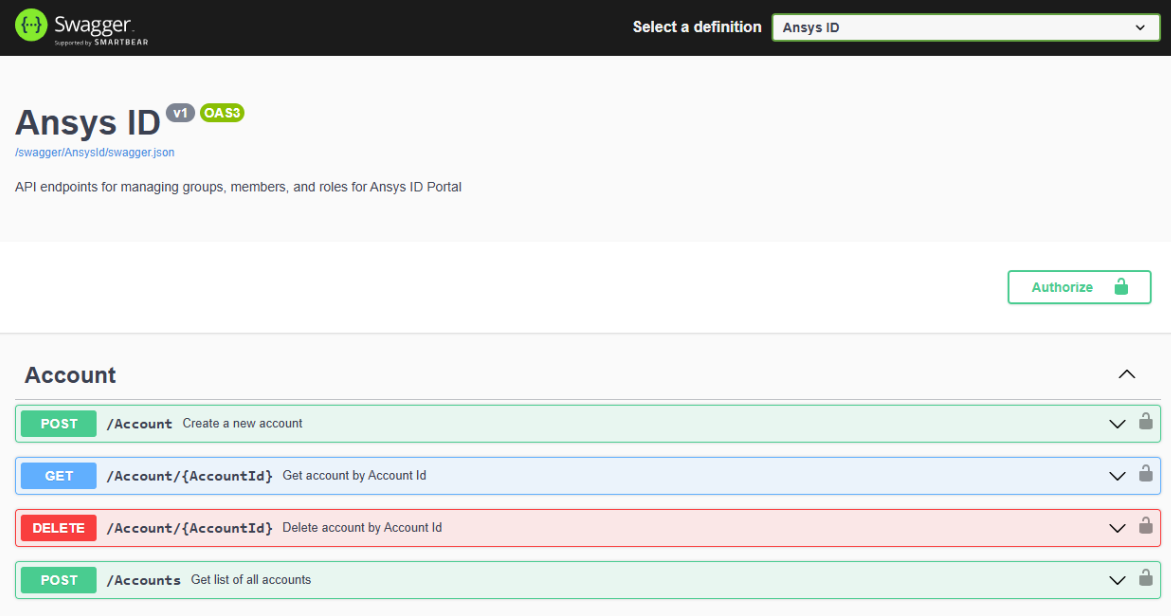
- Authentication Requirements
Most API calls require:
Authorization: Bearer <Ansys ID SSO Access Token>
Content-Type: application/json
Example API Call
curl -X GET https://<portal-url>/api/accounts \
  -H "Authorization: Bearer <your-Access-Token>" \
  -H "Content-Type: application/json"
- Environments
Production
https://iam.ansys.com/swagger/index.html
