Fillet R-Face Mesh Control
1.3.4

Supported Ansys versions:
  • 2021 R1,
  • 2021 R2,
  • 2022 R1,
  • 2022 R2,
  • 2023 R1,
  • 2023 R2,
  • 2024 R1,
  • 2024 R2,
  • 2025 R1,
  • 2025 R2
Required Product:
  • Mechanical
An extension that simplifies setting up mapped meshes on the R face of fillets.
Free
You will be taken to an external site to complete the download.

App Description

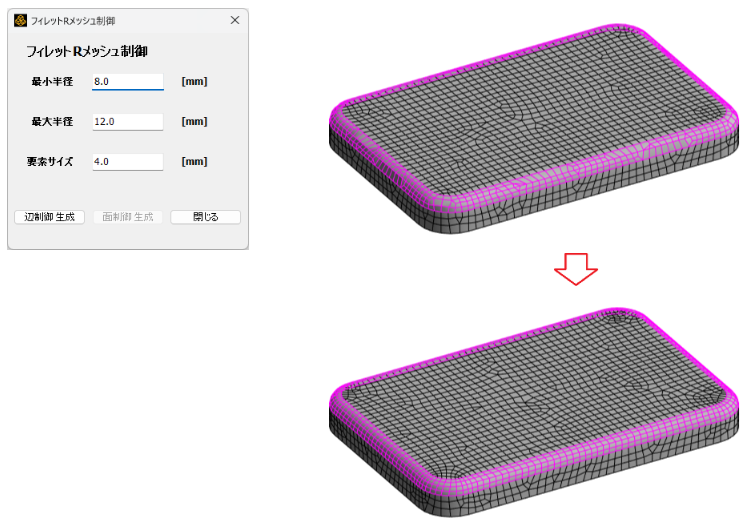
For the arc edges of the R section you wish to control, enter the “Minimum Radius,” “Maximum Radius,” and “Element Size” in the dedicated dialog box, then click the [Generate Edge Control] button. This will perform automatic selection and specify the division size using [Size Control].

Next, clicking the [Generate Face Control] button allows you to set a mapped mesh via [Face Meshing] for faces that include the automatically selected arc edges as one of their constituent edges.


Key Benefits

The dedicated dialog for this tool makes it easier to configure the mapped mesh settings for the R face of the fillet.

Use Cases

In the Mechanical GUI, click [Fillet R Mesh Control] tab > [Show Mesh Control Dialog] to display the dialog. Enter the detection settings for the arc edges to be meshed (specifying minimum and maximum radii) and the meshing size.

Images

Fillet R-Face Mesh Control

Latest version

Fillet R-Face Mesh Control 1.3.4
Supported Ansys versions: 2021 R1, 2021 R2, 2022 R1, 2022 R2, 2023 R1, 2023 R2, 2024 R1, 2024 R2, 2025 R1, 2025 R2
Publisher
Cybernet Systems Corporation
Support information
3 Kanda-neribeicho, Chiyoda-ku, Tokyo 1010022 Japan
81 352973208

Connect with Ansys